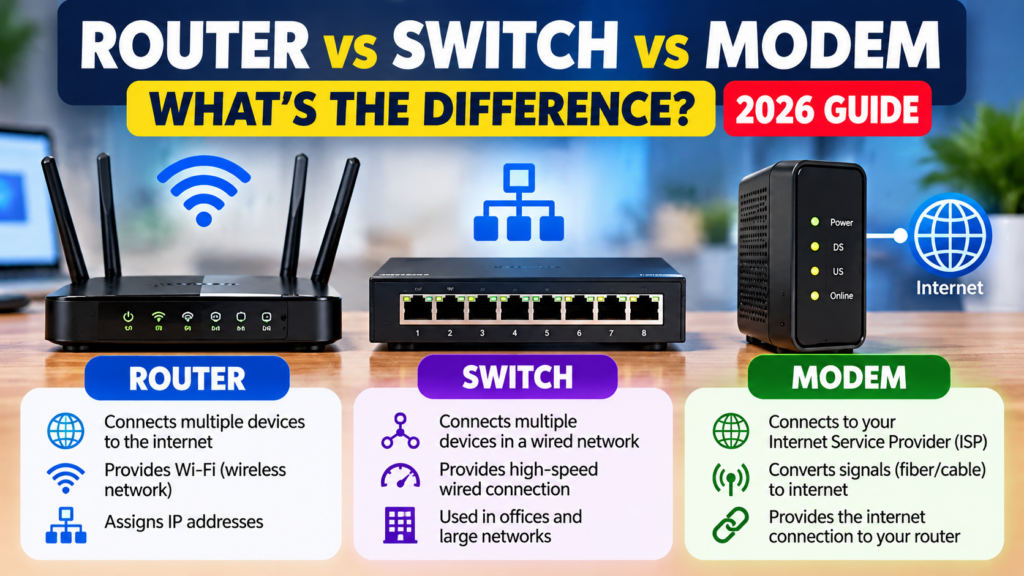
If you use the internet at home or in your office, you have probably heard the words router, switch, and modem. Although these devices are related to networking, each one has a different purpose.
Understanding the difference can help you choose the right networking equipment for your home, office, or small business.
In this guide, we will explain what a modem, router, and network switch do, how they work together, and which devices you may need.
1. What Is a Modem?
A modem connects your network to an internet service provider (ISP) through the access technology supplied by that provider.
Depending on your internet connection, the equipment may be a cable modem, DSL modem, or another type of access device.
For example, your internet service provider supplies an internet connection to your home. The modem or provider-supplied access equipment helps bring that connection into your network.
What Does a Modem Do?
A modem or access device helps:
- Establish a connection with your internet service provider.
- Provide the internet connection to compatible networking equipment.
- Support the access technology used by your internet service.
Example: Your internet provider installs a compatible device at your home so your router can share the internet connection with your devices.
Important: Fibre internet commonly uses an optical network terminal (ONT). Some ONTs and provider devices also include router functions.
2. What Is a Router?
A router connects different networks and directs data between them. In a typical home or office, it connects your local network to the internet.
Many home routers also provide Wi-Fi, a firewall, and several Ethernet ports.
What Does a Router Do?
A typical router can:
- Connect your local network to the internet.
- Allow multiple devices to share one internet connection.
- Provide Wi-Fi connectivity when wireless functionality is built in.
- Assign local IP addresses using DHCP.
- Help protect your network using firewall features.
Example
Imagine that your home has five devices:
- Two smartphones
- One laptop
- One smart television
- One desktop computer
A Wi-Fi router allows these devices to connect to your local network and, when the internet connection is available, access the internet.
Remember: A router and a Wi-Fi router are not always the same thing. Some routers do not have built-in wireless functionality.
3. What Is a Network Switch?
A network switch connects multiple devices within the same local area network (LAN).
Switches are especially useful when an office has several computers, printers, servers, or other devices that need wired network connections.
What Does a Network Switch Do?
A network switch can:
- Connect multiple wired devices.
- Forward Ethernet frames to the appropriate ports.
- Expand the number of available wired network connections.
- Help organise wired networks in offices and businesses.
Example
Suppose your office has eight desktop computers, but your router has only four available LAN ports.
You could connect a compatible network switch to the router and connect additional computers to the switch.
The computers can then communicate over the local network and access the internet through the router, provided the network is configured appropriately.
Types of Network Switches
Unmanaged switch: Simple to set up and suitable for many small home or office networks.
Managed switch: Offers additional configuration and monitoring features, such as VLANs and traffic management.
PoE switch: Can supply electrical power to compatible devices, such as certain wireless access points and IP cameras, through Ethernet cables.
Choose a switch based on the number of ports, network speed, power requirements, and features you actually need.
4. Router vs Switch vs Modem: Key Differences
| Feature | Modem or access device | Router | Network switch |
|---|---|---|---|
| Main purpose | Connects to the ISP’s access network | Connects different networks | Connects devices on a LAN |
| Typical use | Bringing the internet connection into your network | Sharing and routing the connection | Adding wired network connections |
| Connects devices | Depends on the equipment | Yes | Yes, primarily wired devices |
| Built-in Wi-Fi | Not necessarily | Common in home routers | Usually no |
| Routes between networks | Usually not its main role | Yes | Not a standard Layer 2 switch’s main role |
| Common use | Home or office internet connection | Home, office, or business network | Offices, computer labs, and wired networks |
The exact functions depend on the equipment. Some devices combine several functions in one unit.
5. How Do a Modem, Router, and Switch Work Together?
Consider a small office with an internet connection and several computers.
A typical network may work like this:
Internet Service Provider → Modem or ONT → Router → Network Switch → Computers and Printers
Here is the process:
- The internet service provider delivers the internet connection.
- The modem or ONT provides the appropriate connection to the local network equipment.
- The router directs traffic between the office network and the internet.
- The switch connects multiple wired computers and printers.
- Computers can access local network resources and the internet according to the network configuration.
If the router already has enough LAN ports, you may not need a separate switch.
If your router includes Wi-Fi, wireless devices can connect directly to it without requiring Ethernet cables.
Note: This is a common arrangement, not a universal requirement. Some providers supply an all-in-one device that combines the ONT or modem, router, switch, and Wi-Fi access point.
6. Which Device Do You Need?
The right choice depends on your situation.
For a Home Internet Connection
You generally need the access equipment required by your internet provider and a router or combined gateway to connect your devices.
If your provider has supplied an all-in-one device with working Wi-Fi, you may not need to purchase another router.
For a Small Office
A suitable router may be enough for a small office with only a few wired devices and wireless users.
If you need more wired connections, consider adding an Ethernet switch.
For an Office with Many Computers
A network switch can provide additional wired ports for computers, printers, and other network devices.
For larger or more complex networks, a managed switch may be useful if you need VLANs, monitoring, or other advanced features.
For IP Cameras or Wireless Access Points
If you want to power compatible devices through Ethernet cables, consider a Power over Ethernet (PoE) switch.
Check that the switch supports the required PoE standard and supplies enough total power for all connected devices.
7. What Should You Check Before Buying Networking Equipment?
Before purchasing a router or switch, consider the following factors.
1. Internet speed: Choose equipment that supports the speed of your internet connection and your expected future needs.
2. Ethernet port speed: Check whether you need Gigabit Ethernet or faster connections.
3. Number of ports: Count the wired devices you plan to connect, and allow some room for future expansion.
4. Wi-Fi requirements: Consider your home or office size, the number of wireless devices, and Wi-Fi coverage.
5. Security and updates: Look for products with ongoing firmware updates and suitable security features.
6. PoE requirements: If you plan to power cameras or access points through Ethernet, check the supported PoE standards and power budget.
7. Management features: Decide whether an unmanaged switch is sufficient or whether you need VLANs and other managed features.
8. Compatibility: Confirm that the equipment works with your internet provider and existing network.
Avoid purchasing equipment based only on the brand or the highest advertised speed. Select a product that matches your actual requirements.
8. Frequently Asked Questions
Can a router work without a modem?
Yes. A router can create and manage a local network without a modem. However, internet access requires an appropriate connection to an internet service or another upstream network.
Can I use a switch without a router?
Yes. A switch can connect devices within a local network without a router. However, communication between different networks and internet access may require additional equipment.
Does a modem provide Wi-Fi?
A traditional modem does not necessarily provide Wi-Fi. Many modern provider-supplied gateways combine access, routing, and wireless functions in one device.
Do I need both a router and a switch?
Not always. A router with enough Ethernet ports may be sufficient. A separate switch is useful when you need more wired connections or additional switching features.
Is a switch faster than a router?
Neither is automatically faster in every situation. Performance depends on the device specifications, port speeds, processing capabilities, network traffic, and configuration.
Conclusion
A modem or other access device connects your network to the internet service provider. A router connects different networks and directs traffic, while a network switch connects multiple devices within a local network.
For many homes, a combined internet gateway is sufficient. For small offices with several wired devices, adding a network switch can make the network easier to expand.
Understanding these differences will help you choose networking equipment that suits your needs without spending money on unnecessary features.
Explore more guides on TechPathGuide for practical software tutorials, computer networking advice, and technology buying tips.